The 5 Agentic AI Use Cases Every Business Operator Should Know
Here's a scene I see over and over: a leadership team calls me in because they've heard "AI agents" in every conference keynote for the past year, and they want to know what they're actually supposed to do with it. They've got a whiteboard with a dozen ideas, a nervous IT director, and a budget conversation coming up in six weeks.
What they don't have is a clear picture of where AI agents are actually delivering results, versus where they're still expensive science experiments.
I started building internet infrastructure in 1995, before most people had email. I ran operations in seven countries, including humanitarian supply chains in Ethiopia, Kenya, and Haiti, where "working system" meant it had to function with intermittent power, unreliable connectivity, and staff turnover you couldn't predict. I'm not a technologist who learned business. I'm a business operator who mastered technology, and the difference matters when you're about to commit real money to something.
So let me give you the honest version. Not the whitepaper version, not the vendor pitch version. These are the five agentic AI use cases that are producing measurable results right now, what you'll need in place before you build them, and where they still have edges sharp enough to cut you.
By the end of 2026, 40% of enterprise applications will be integrated with AI agents, up from less than 5% in 2025. [1] The market is moving faster than most companies can absorb. The organizations that'll win aren't the ones who adopt the most tools. They're the ones who pick the right three or four and actually deploy them into production.
Here are the five I'd bring to your next leadership meeting.

Use Case 1: Lead Qualification and CRM Enrichment
What It Is
An AI agent that monitors your inbound lead flow, pulls data from multiple sources (your CRM, LinkedIn, company databases, web research, email engagement signals), scores each lead against your ideal customer profile, writes a qualification summary, and routes the ranked leads to the right rep, often before the rep has even opened their laptop in the morning.
The more sophisticated versions go further: they'll identify the right contact within an account, draft a personalized outreach note, and log the whole interaction back to your CRM without anyone touching a keyboard.
What It Replaces
Manual lead research, copy-paste data entry into CRM fields, and the judgment calls reps make on the fly about which leads to call first. It also replaces the uncomfortable reality that most sales teams have a pile of inbound leads aging in a queue while reps chase the ones they already know.
The Numbers
AI reduces lead research time from 15 to 20 minutes per lead down to about 30 seconds, cutting the cost per qualified lead from $75 to under $1. [2] Sales reps in teams that have deployed this well typically recover 8 to 12 hours per week that used to disappear into data entry and manual scoring. [2]
The conversion impact compounds on top of the time savings. Companies using AI-powered lead scoring report 138% ROI compared to 78% for those without it. [2] B2B companies using AI-driven lead generation have seen an average 73% increase in qualified leads within six months. [2] And Deloitte's 2024 AI survey found that organizations applying AI to sales operations reported a 31% average cost reduction in customer acquisition workflows. [3]
Morgan Stanley deployed an AI agent that generates post-meeting notes and syncs them directly to Salesforce CRM after every advisor call. Voluntary adoption hit 98%, which is extraordinary: most enterprise software deployments don't break 60% even with a mandate. [4] That number tells you everything about whether the tool was actually useful or just another thing someone bought.
What You Need Before You Build It
- A CRM that's clean enough to train on. If your data is a mess, the agent will produce confident-sounding garbage.
- A defined ideal customer profile. You can't score leads without criteria.
- Clear routing rules. The agent needs to know which lead goes to which rep, and why.
- A human review step, at least at first. Let the agent do the work, have a human verify the top outputs for the first 60 days, then loosen the leash as trust builds.
Difficulty Rating: Medium
The technology is available in mature platforms (HubSpot, Salesforce, Clay, Default, Relevance AI). The harder work is data hygiene and getting sales to trust a machine over their gut. Expect 6 to 10 weeks to go live with something meaningful.
Tools Typically Used
Clay, Default, HubSpot AI, Salesforce Einstein, Relevance AI, Apollo.io with AI enrichment layers.
Use Case 2: Document Processing and Data Extraction
What It Is
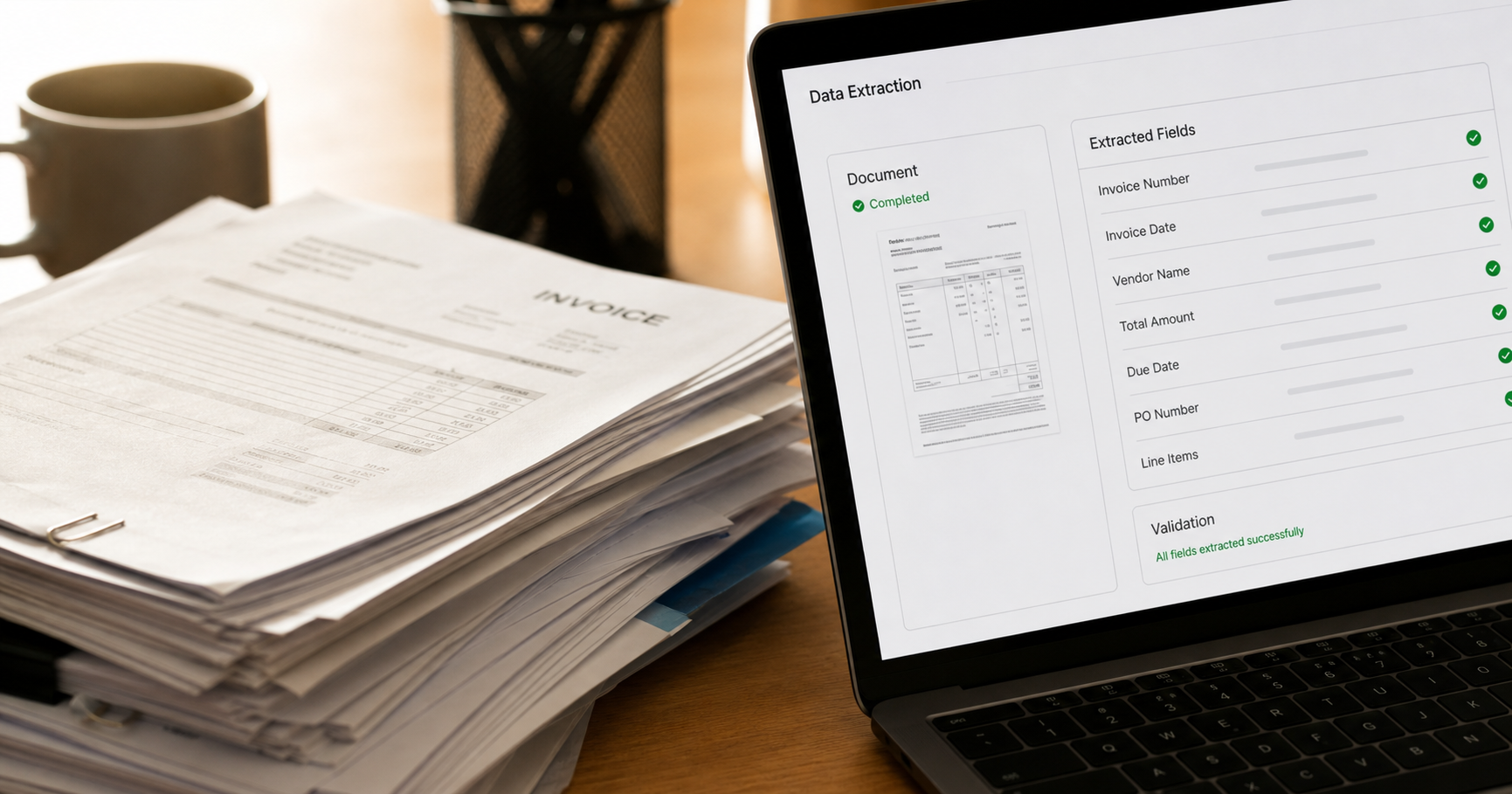
An AI agent that reads unstructured documents, contracts, invoices, claims forms, intake packets, shipping manifests, and extracts the structured data your systems need. It validates what it extracted, flags exceptions for human review, and logs the results without manual data entry.
In a well-designed system, the agent also learns from the corrections your team makes on exceptions, which means accuracy improves over time rather than staying flat.
What It Replaces
Manual data entry. The kind that burns through administrative headcount, introduces transcription errors, and creates a downstream correction cycle that everyone pretends doesn't exist but costs real money every quarter.
The Numbers
Here's a case study worth putting in front of your CFO: a 45-person insurance brokerage processing roughly 800 invoices per month deployed an AI document extraction system. Prior process averaged 12 minutes of manual work per invoice. Post-deployment: 90 seconds per invoice with AI extraction plus human spot-check. Implementation cost: $22,000. Annual labor savings: $67,000. Payback period: under four months. The accuracy improvement also eliminated approximately 340 hours per year of downstream error correction. [5]
Finance and compliance workloads broadly show over 40% cost reduction when AI is applied systematically. [6] Fidelity Investments reported a 50% reduction in time-to-contract through AI-assisted document workflows. [6]
The ROI case for document processing is usually the cleanest of any AI use case, because the labor being displaced is well-defined, the volume is predictable, and you can measure accuracy before and after with actual data. It's not a fuzzy "productivity improvement." It's a before/after table you can audit.
What You Need Before You Build It
- Document samples that cover your actual variance. If your invoices come in 12 different formats, you need examples of all 12.
- A clear exception-handling process. The agent won't get everything right. You need a defined queue for human review of low-confidence extractions.
- Integration into your destination system, whether that's your ERP, your CRM, your practice management software, or your accounting platform.
- Compliance review if you're in a regulated industry. Document processing agents touching PHI, PII, or financial data have specific guardrails you need to design in from the start, not bolt on afterward.
Difficulty Rating: Medium to Hard
The extraction AI itself is mature and well-tested. The integration work and exception-handling design are where most implementations get into trouble. Don't let a vendor sell you on "it just works." Get specific about how it handles variance and what happens when confidence is low.
Tools Typically Used
UiPath, Azure Document Intelligence, AWS Textract, Nanonets, Reducto, Docsumo.
Use Case 3: Customer Service Triage and Escalation Routing
What It Is
An AI agent that reads or listens to incoming customer requests, classifies the issue type and urgency, resolves the ones it can resolve autonomously (password resets, order status, basic FAQs, policy lookups), and routes everything else to the right human agent with a context summary already written.
The routing piece is often underestimated. Getting a customer to the right person on the first transfer, with context attached, is worth more than the deflection rate alone.
What It Replaces
First-line triage by human agents, which is expensive, slow, and creates inconsistent customer experiences depending on who picks up. It also replaces the loop where a customer gets transferred twice, has to repeat their story each time, and ends up more frustrated than when they started.
The Numbers
Klarna deployed a conversational AI agent handling routine queries across 23 markets in 35 languages. Resolution time dropped from 11 minutes to under 2 minutes. Repeat inquiries fell by 25%. The savings came to $60 million, equivalent to the workload of 853 full-time agents as of Q3 2025. [4]
Importantly, Klarna later reintroduced human agents for complex and emotionally charged queries. The hybrid model outperformed the fully automated setup. [4] That's not a failure story. It's a design lesson: AI handles volume, humans handle nuance.
Forrester research shows companies deploying AI for customer service see a 35 to 50% reduction in ticket handling time, with the strongest results appearing when AI handles triage and context gathering rather than attempting full resolution on every ticket. [7] Contact center agent productivity increases by an average of 1.2 hours per day with AI routing support. [6]
The math on this is unusually legible. If your team handles 10,000 tickets per month at $8 per ticket and AI deflects 35% of that volume, you're looking at $28,000 in monthly savings. Against a one-time implementation cost, payback typically falls between six and twelve months in well-scoped deployments. [5]
What You Need Before You Build It
- A categorized ticket history. You can't train a routing agent without knowing how your issues break down.
- Human escalation paths that are actually mapped. The agent needs to know who handles billing disputes versus technical failures versus complaints. If that routing logic doesn't exist as documentation, you have to build it first.
- Clear resolution scope. Define what the agent is allowed to resolve autonomously and what always requires a human. Scope creep here is where things go wrong.
- A quality monitoring process. Sample the interactions weekly for the first quarter. You want to catch failure patterns before customers do.
Difficulty Rating: Medium
There's solid tooling available and the use case is well-understood. The risk isn't the technology, it's deploying an agent with poorly defined scope and then being surprised when it tries to refund something it wasn't supposed to.
Tools Typically Used
Intercom Fin, Zendesk AI, Salesforce Service Cloud AI, Freshdesk Freddy AI, Ada, Kustomer.
Use Case 4: Invoice and Payment Follow-Up
What It Is
An AI agent that monitors your accounts receivable, identifies invoices approaching or past due, drafts and sends personalized follow-up communications at defined intervals, adjusts tone and approach based on the customer's history and account value, logs every interaction to your accounting system, and escalates to a human collections specialist only when the situation warrants it.
The more advanced versions also predict which invoices are likely to go late based on customer payment history, so your team can get ahead of it rather than react to it.
What It Replaces
Manual collections follow-up, which is one of the most uncomfortable tasks in any small or mid-sized business. Nobody loves calling customers about overdue invoices. As a result, it's often done inconsistently, too late, and with less data than it should be.
The Numbers
The statistics on AI-assisted accounts receivable are some of the most consistent I've seen across any category. Companies implementing AR automation see a 33-day reduction in Days Sales Outstanding (DSO) on average, and a 50% reduction in 90-day aged accounts. [8] Companies automating more than half of their AR workflows reported a 32% reduction in DSO, equivalent to getting paid 19 days faster. [8]
Automated payment reminders alone, even simple rule-based ones before you add AI, reduce DSO by 8 to 12 days. [8] Add intelligent timing, personalization, and predictive risk scoring, and you start to see the bigger numbers.
For professional services firms in particular, the Crescent AI research puts the ROI for AI invoice and payment automation at 300 to 600% in the first 90 days, with AR days reduced by 15 to 25%. [9] For a $2M revenue services firm with 45-day average DSO, cutting that to 30 days means roughly $82,000 in cash that's no longer sitting in receivables. That's not hypothetical money. That's working capital you can actually use.
92% of companies report faster cash flow after implementing AR automation, and almost half report more predictable, stable cash flow as a secondary benefit. [8] Predictable cash flow isn't glamorous, but if you've ever had to push payroll because three big clients paid late in the same week, you know exactly what it's worth.
What You Need Before You Build It
- Accounting software with an API (QuickBooks, NetSuite, Xero, Sage, FreshBooks all qualify).
- A defined collections cadence. Day 1 reminder, day 7 follow-up, day 21 escalation: you need to know your own rules before you automate them.
- Customer segmentation. A $500 invoice from a first-time customer gets different treatment than a $50,000 invoice from a 10-year relationship. The agent needs those tiers.
- A human handoff point. When a customer disputes an invoice or has a relationship-sensitive situation, the agent needs to recognize that and flag it immediately rather than continuing to send automated messages.
Difficulty Rating: Low to Medium
This is one of the most straightforward agentic AI applications available, and the tooling has matured considerably. You can get a basic version running in two to three weeks. The sophistication you add over time, predictive scoring, personalized messaging, CRM cross-referencing, is where the additional weeks go.
Tools Typically Used
Tesorio, Billtrust, Versapay, Kapittx, Upflow, and increasingly native AI features in QuickBooks and Xero.
Use Case 5: Internal Knowledge Query Routing
What It Is
An AI agent that sits in front of your company's internal knowledge: your documentation, your SOPs, your product manuals, your HR policies, your past project files, your compliance guides. When an employee asks a question, the agent finds the answer, cites the source, and either responds directly or routes the question to the right person if it can't find a reliable answer.
The best implementations go further: they identify questions that keep getting asked but don't have good documentation, flag those as knowledge gaps, and prompt someone to fill them.
What It Replaces
The 18 emails asking the same question that only one person knows the answer to. The half-hour a new hire spends hunting through a shared drive that hasn't been organized since 2019. The senior expert who gets interrupted six times a day because they're the only one who knows where something is.
The Numbers
McKinsey research showed that knowledge workers spend 1.8 hours every day searching and gathering information, roughly 9.3 hours per week. [10] IDC puts the number even higher: approximately 2.5 hours per day, or 30% of the workday, on information retrieval activities including searching, requesting from colleagues, waiting for responses, and verifying currency. [10]
Organizations with strong knowledge management systems can reduce time lost to information search by up to 35% and boost overall organizational productivity by 20 to 25%, according to McKinsey. [10] A 20 to 25% productivity increase is the equivalent of gaining one full productive workday per employee per week. That's not a marginal improvement.
The global knowledge management software market was valued at $23.2 billion in 2025 and is projected to reach $74.2 billion by 2034. [10] That's not an indication of a niche problem. That's an indication of a problem almost every organization of any size has, even if they haven't named it yet.
For customer-facing teams specifically, this use case reduces the time a support agent spends hunting for a policy answer during a live customer interaction, which directly affects handle time and customer satisfaction scores.
What You Need Before You Build It
- A knowledge base that's actually current. An AI agent pointed at outdated documentation will confidently surface wrong answers. Before you build the agent, you need a documentation audit.
- Source labeling. The agent needs to know which sources are authoritative and which are working drafts or superseded versions.
- A feedback loop. Employees need an easy way to flag when the agent gives a wrong or incomplete answer. Without that loop, you won't know about failures until they cause real problems.
- Clear scope boundaries. Define what the agent answers and what it escalates. "I don't know, let me connect you with HR" is a better answer than a confident wrong one.
Difficulty Rating: Medium
The retrieval technology (RAG, or Retrieval-Augmented Generation) is mature and widely deployed. The challenge is documentation quality and keeping the knowledge base current. A good deployment plan includes a dedicated owner for knowledge base maintenance, not just a launch.
Tools Typically Used
Notion AI, Confluence AI, Guru, Glean, Guru, Elastic with vector search, Microsoft Copilot for SharePoint environments.
What All Five Have in Common
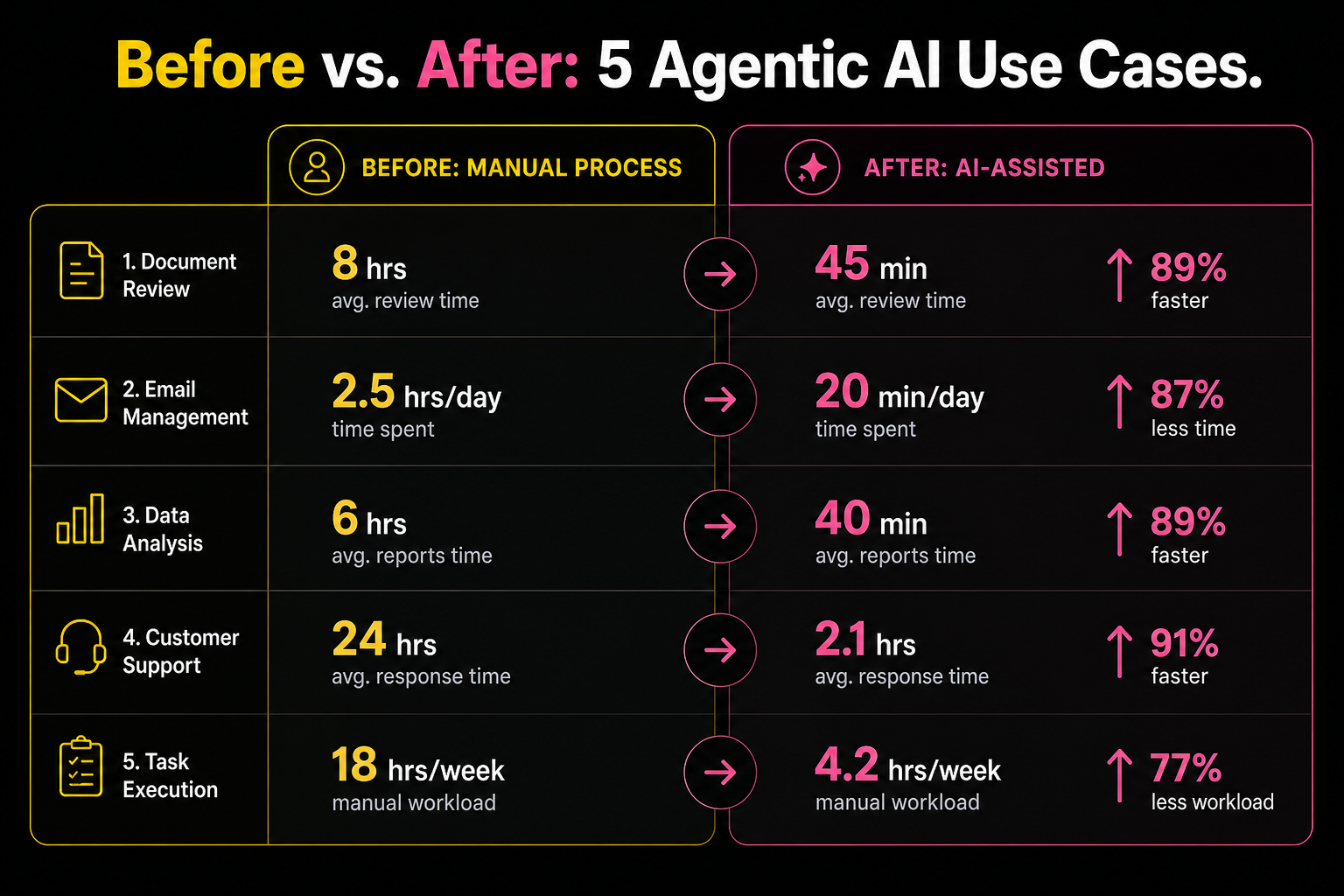
I've built systems that have to survive contact with reality, in places where failure wasn't theoretical. There are a few things I've learned about what makes the difference between a working system and an expensive pilot that gets quietly shut down six months later.
Clean data is not optional. Every one of these five use cases depends on the quality of what you feed it. Bad CRM data produces bad lead scoring. Messy accounting records produce wrong AR follow-ups. Outdated documentation produces confident wrong answers. The AI will not compensate for your data debt. It will amplify it.
Start with human-in-the-loop, then earn autonomy. The organizations that deploy agentic AI successfully don't hand the keys over on day one. They run the agent alongside the existing process, compare outputs, identify failure patterns, and expand scope as trust is established. 66% of companies struggle to establish ROI metrics for AI initiatives, and a big reason is they skip this phase and can't measure what changed. [6]
Define what success looks like before you build. Not "improved efficiency." Something measurable: DSO reduced by X days, lead research time cut from Y minutes to Z seconds, ticket deflection rate of N%. If you can't define the number before you start, you won't be able to defend the investment afterward.
The hardest part is never the technology. It's change management. It's getting the sales team to trust the lead score. It's getting the AR team to let the agent send the first follow-up. It's getting the support team to route by the agent's classification instead of their gut. The tools are available and they work. The organizational work of trusting them is where most projects slow down.
My Recommendation
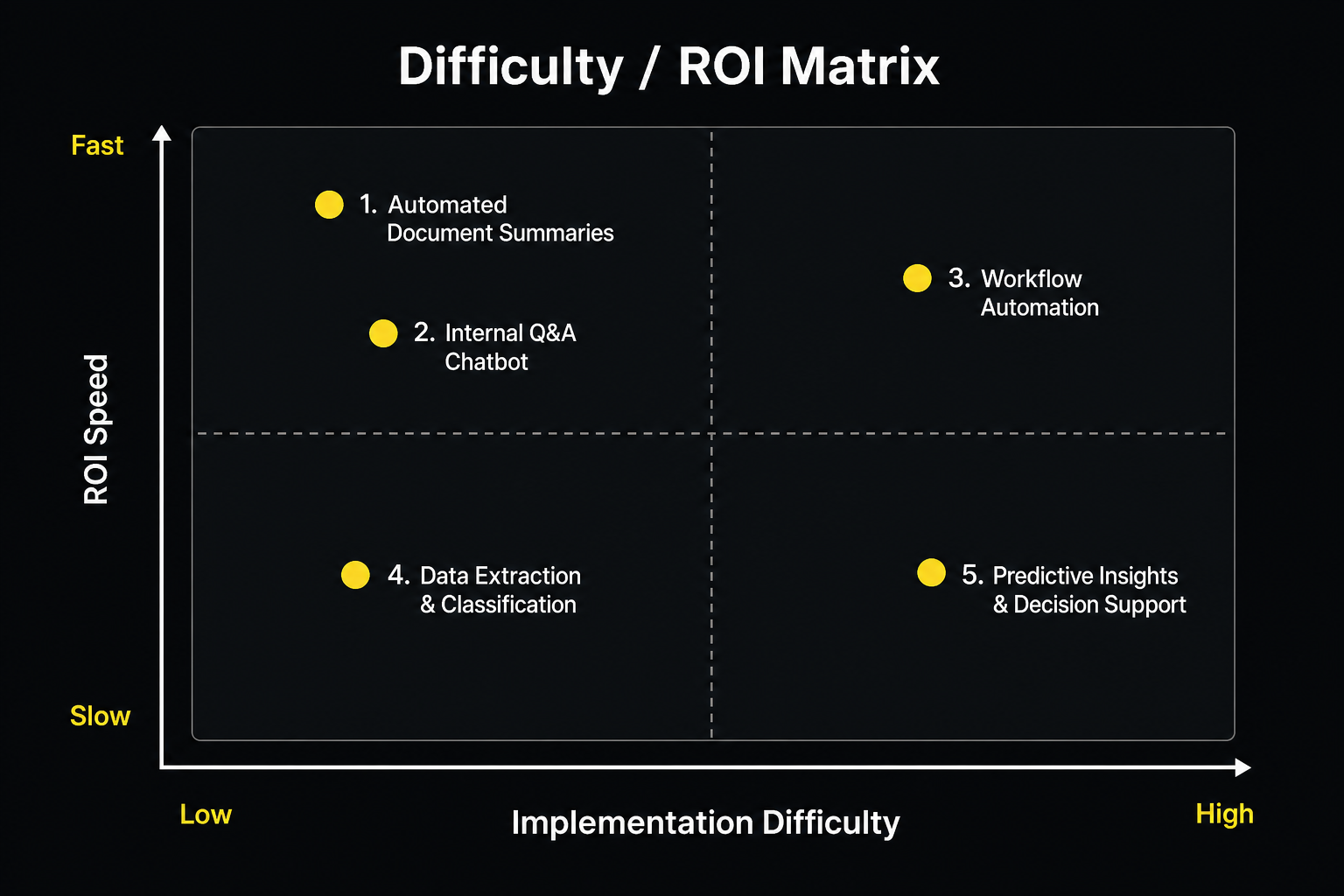
If you're bringing this to a leadership meeting, I'd suggest starting with use cases 4 and 5. Invoice follow-up has the fastest payback and the lowest organizational resistance, because it automates a task almost nobody enjoys doing manually. Internal knowledge routing has the broadest benefit: it makes every employee faster from day one.
After you have one win with clean data and a measurable outcome, the next conversation about cases 1, 2, and 3 becomes much easier to have.
I'm building my AI consulting practice now, with honest footing. What I bring isn't a long list of AI engagements. It's 30 years of knowing what good system design looks like in practice, a Cap Gemini background helping businesses adopt transformative technology before the playbook existed, and hands-on experience building AI agents and web apps with Claude Code and Codex. I know where these implementations go wrong because I've built systems that couldn't afford to go wrong, in orphanages in Ethiopia and Haiti and humanitarian supply chains that ran on intermittent infrastructure.
Agentic AI is genuinely the most powerful operational leverage I've seen in my career. But it's leverage, not magic. Point it at the right problems, give it clean inputs, and keep a human in the loop until you've earned the right to remove one. That's how you get the result you're looking for. Not by betting everything at once, but by building carefully and expanding what works.
Sources
[1] TechAhead, "Top Use Cases of Agentic AI in 2026 Across Industries," https://www.techaheadcorp.com/blog/top-use-cases-of-agentic-ai-in-2026-across-industries/, 2026
[2] Warmly.ai / Monday.com, "AI-driven lead qualification explained: save time and close more deals in 2026," https://monday.com/blog/crm-and-sales/ai-driven-lead-qualification/, 2026
[3] Deloitte, "State of AI and Intelligent Automation in Business Survey," https://www2.deloitte.com/us/en/insights/focus/cognitive-technologies/state-of-ai-and-intelligent-automation-in-business-survey.html, 2024
[4] AI Monk / CX Dive, "12 Agentic AI Examples With Measurable ROI: Enterprise Case Studies From 2025-2026," https://aimonk.com/agentic-ai-examples-enterprise-roi-case-studies/, 2026
[5] Arsum, "Real-World AI Automation ROI Examples by Business Function," https://arsum.com/blog/posts/ai-automation-roi-examples/, 2025
[6] Fullview, "200+ AI Statistics and Trends for 2025: The Ultimate Roundup," https://www.fullview.io/blog/ai-statistics, 2025
[7] Forrester Research, "The ROI of AI-Powered Customer Service," https://www.forrester.com/report/the-roi-of-ai-powered-customer-service, 2025
[8] Tesorio, "Accounts Receivable and Payable Automation in 2025: How to Cut DSO by 33 Days and Triple Productivity," https://www.tesorio.com/blog/accounts-receivable-payable-automation-in-2025-how-to-cut-dso-by-33-days-and-triple-productivity, 2025
[9] Crescent AI, "AI Automation for Small Business: Complete 2026 Guide (With ROI Data)," https://www.ai-crescent.com/blog/ai-automation-for-small-business, 2026
[10] McKinsey Global Institute / IDC / Speakwise, "Knowledge Management Statistics 2026," https://speakwiseapp.com/blog/knowledge-management-statistics, 2026