AI Workflow Automation ROI: How to Know If It's Worth It Before You Start
Here's something I've seen too many times: a business owner calls me three months after writing a check for an AI automation project, and the question isn't "how do we scale this?" It's "why isn't this working?"
The painful part is that the ROI was never calculated before the build started. Someone saw a demo, heard a number like "80% time savings," and signed off. The vendor was optimistic. The business owner was hopeful. Nobody did the math.
I've been building systems since 1995, when I launched adoption.com before Google existed. I've operated in seven countries, including running humanitarian infrastructure in Ethiopia, Kenya, and Haiti where every dollar had to justify itself twice. I'm a medical technologist by training, which means I don't trust a result until I've measured it under controlled conditions. And I founded Verity Agentic because I kept watching businesses throw money at AI without a framework for knowing whether it would pay.
So let me give you that framework. Before we touch a single line of code, before you talk to a vendor, before you authorize a single sprint, here's how I calculate whether automation is worth it.

Why Most AI ROI Estimates Are Wrong
The numbers you read in vendor decks are almost never lying exactly. They're just cherry-picking the best-case outcome from a carefully selected reference customer.
The industry-wide reality is sobering. Between 70% and 85% of AI initiatives fail to meet their expected outcomes.[1] In 2025, 42% of companies abandoned most of their AI initiatives, up from just 17% the year before.[2] The average organization scrapped 46% of AI proof-of-concepts before they reached production.[2]
And here's the one that should stop you cold: only 6% of organizations qualify as what researchers call "AI high performers," meaning they see a meaningful, measurable contribution to their operating margins.[2]
That's not a technology problem. It's a measurement problem. Sixty-six percent of companies struggle to establish ROI metrics for their AI initiatives in the first place.[2] You can't hit a target you haven't defined.
The companies that do win, win hard. Top performers see $10.30 in return for every dollar invested in generative AI.[3] Focused workflow automations pay back in two to six months.[4] But the distribution is bimodal: you either do this right and the numbers compound in your favor, or you do it halfway and end up worse than before.
The difference between those two outcomes almost always comes down to whether someone ran the numbers honestly before the project started.
The 5-Step ROI Calculation Framework
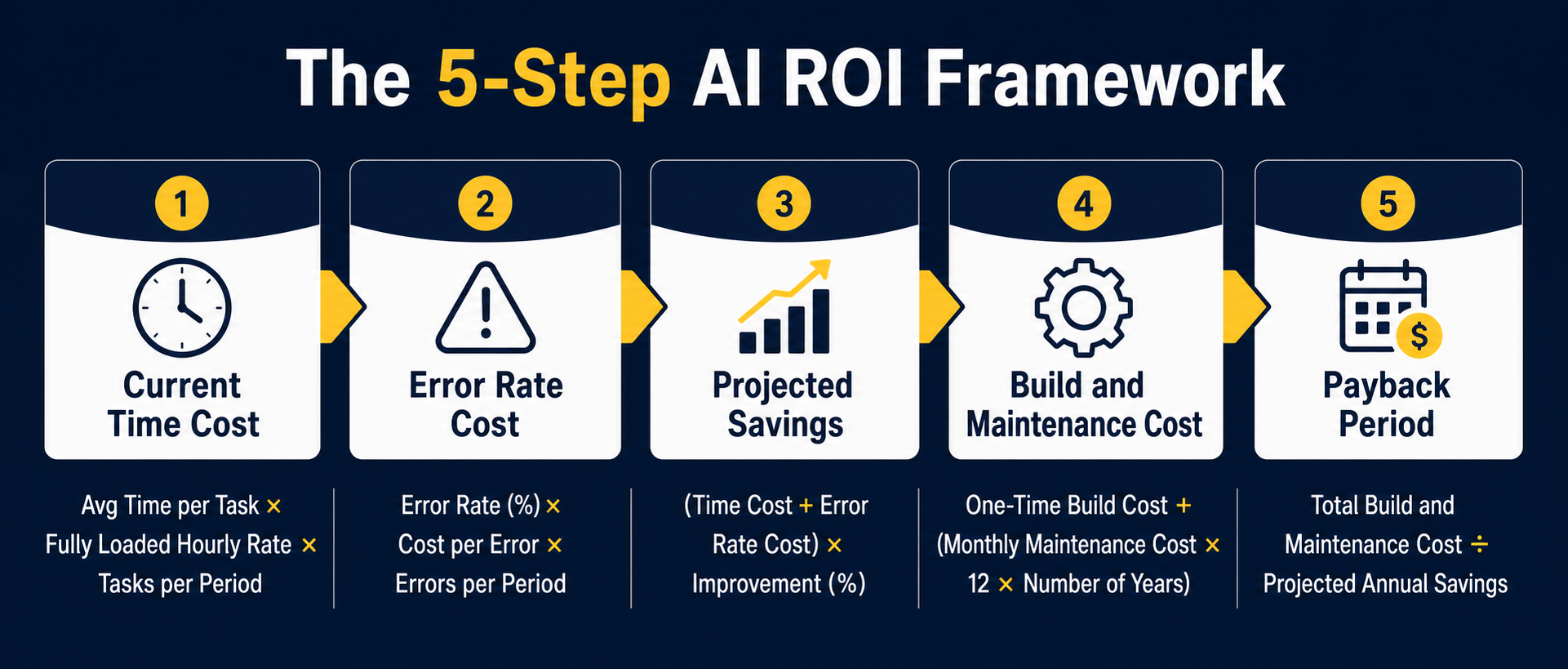
I use this same five-step framework with every client, whether we're looking at a $2,000 no-code automation or a $200,000 custom AI pipeline. The math doesn't change. Only the scale does.
Step 1: Calculate Your Current Time Cost
Start here. Not with the AI. With the process as it exists right now.
Measure how many hours per week your team actually spends on the process you're considering automating. Don't use best-case estimates. Follow someone through a complete execution. Include interruptions, exceptions, and the edge cases that eat 20% of the time that never shows up on the estimate.
Then calculate your fully loaded hourly cost. This is not the hourly wage. It's the total cost of that employee to the business, including salary, benefits, payroll taxes, and overhead. A good rule of thumb: take the annual salary, divide by 2,080 hours, and multiply by 1.4 to 1.6.[5]
A $50,000/year employee costs you roughly $34 to $38 per hour fully loaded. A $75,000/year employee runs $51 to $58. These numbers matter because vendors quote you labor savings in hours. Hours have a dollar value attached, and that dollar value is higher than you think.
The formula:
Current Annual Time Cost = Hours per week x Loaded hourly rate x 52
Write that number down. It's your baseline. It's what you're comparing against everything else.
Step 2: Calculate Your Error Rate Cost
Every manual process has an error rate. Most people undercount it because the errors are distributed: a wrong field on a form, a misrouted document, a miscalculated figure that gets caught two steps downstream by someone who bills by the hour.
Manual processes typically run error rates between 5% and 10%.[5] AI automation can bring that below 1%.[5] The question is: what does each error cost you?
Error costs come in several forms. There's the direct rework cost: someone's time to find the error, fix it, and reprocess whatever it touched. There's the downstream cost: a wrong invoice number that delays payment, a compliance error that requires an audit trail, a customer who received the wrong information and called in. And there's the cost you rarely budget for: the management time spent triaging the exceptions.
The formula:
Annual Error Cost = (Monthly volume x Error rate x Cost per error) x 12
In document-heavy processes, costs per error can run $40 to $200 once you account for all the downstream effects. If you're processing 500 invoices a month at a 6% error rate and each error costs $80 to fix: that's 30 errors per month, times $80, times 12 months. That's $28,800 per year in error costs that aren't showing up as a line item anywhere in your budget.
Step 3: Calculate Projected Automation Savings
This is where I push back hardest on vendor numbers. If a vendor tells you their system will eliminate 90% of your labor, budget for 50% to 60%.[6] If they say 80%, model 45% to 55%. Apply a 20% haircut to whatever the most conservative benchmark suggests, to account for implementation imperfections, the edge cases your process has that their demo didn't, and the learning curve.
The research supports being conservative. Focused workflow automations, the kind that target one clear bottleneck, tend to deliver real savings of 40% to 70% in the first year. Contact center automations run wider, from 200% to 1,000% ROI.[7] But those aren't the relevant benchmarks for most businesses. Invoice processing, scheduling, data extraction, and report generation sit in a more modest range: 40% to 65% labor reduction is realistic if you've done the implementation work properly.
The formula:
Projected Annual Savings = (Current Time Cost + Error Cost) x Conservative Automation Percentage
If you want to model scenarios, run three: conservative (40%), realistic (55%), and optimistic (70%). Make your business case on the conservative number. If it doesn't work on the conservative number, the project needs to be rescoped.
Step 4: Calculate Build and Maintenance Cost
This is the line that most AI ROI calculations get wrong. They budget for the build. They forget everything else.
Here's what goes into the real cost of an AI automation project:
One-time costs:
- Software development or configuration
- Data preparation and integration (this alone can consume 50% to 65% of project resources[8])
- Testing and QA
- Training and change management
- Any API or platform licensing fees paid upfront
Ongoing annual costs:
- Software subscription fees
- Compute costs (API calls, inference costs, storage)
- Maintenance and iteration (budget 15% to 25% of your initial implementation cost, every year[6])
- Monitoring and exception handling
- The internal staff time required to own the system
That last one is where businesses get surprised. Every AI automation needs an owner. Someone has to watch the monitoring dashboard, handle the exceptions the AI doesn't know how to handle, and manage the vendor relationship. If you don't budget for that person's time, the system degrades over 12 to 18 months and you're back to doing it manually while paying for a system that's running in the background.[6]
The formula for total three-year cost:
Total Investment = Build Cost + (Annual Maintenance x 3) + (Annual Operating Costs x 3)
Step 5: Calculate Payback Period
Now the math gets satisfying.
The formula:
Payback Period (months) = Total Build Cost / (Monthly Savings - Monthly Operating Costs)
If your monthly savings exceed your monthly operating costs by a meaningful margin, and your payback period is under 12 months, you've got a project worth doing. For focused workflow automations, the sweet spot is two to six months.[4]
For broader departmental implementations, six to twelve months is realistic. For enterprise-wide transformation, research from Gallagher's 2026 AI Adoption and Risk Benchmarking puts the average payback at 28 months, longer than earlier projections because companies now have a clearer picture of what full integration actually costs.[4]
Micro-automations, the kind built on Zapier, Make, or a prompt chain, can pay back in under 60 days if they're targeted at a real bottleneck.[4] That's often the right place to start.
A Worked Example: Invoice Processing for a 3-Person Team

Let me walk you through a realistic scenario so you can see how the numbers actually land.
The situation: A three-person professional services firm processes invoices manually. Two team members spend roughly five hours per week each on invoice-related work: entering data, chasing down approvals, fixing errors, and reconciling discrepancies. The third team member spends about two hours a week on exception handling and reporting. That's twelve hours per week total.
Their average loaded hourly cost is $40 per hour.
Step 1: Current Time Cost
12 hours/week x $40/hour x 52 weeks = $24,960/year
Step 2: Error Rate Cost
They process approximately 200 invoices per month. Their current error rate, measured honestly over a two-month audit, is 7%. That's 14 errors per month. Each error requires an average of 45 minutes to correct, plus the downstream effects of delayed payment or reprocessing.
At $40 fully loaded, each error costs roughly $60 in direct correction time, plus an estimated $20 in downstream effects. Call it $80 per error.
14 errors/month x $80/error x 12 months = $13,440/year
Total Current Annual Cost
$24,960 (time) + $13,440 (errors) = $38,400/year
Step 3: Conservative Automation Savings
An AI document extraction system, based on comparable implementations in the research,[9] can realistically reduce manual labor on invoice processing by 55% to 70%. We'll model at 55% to be conservative.
$38,400 x 55% = $21,120/year in projected savings
Step 4: Build and Maintenance Cost
Based on comparable insurance brokerage and professional services implementations,[9] a system handling 200 invoices per month with integration into existing accounting software runs approximately $8,000 to $12,000 to build and configure. We'll use $10,000.
Annual maintenance: 20% of build cost = $2,000/year.
Annual compute and subscription costs: approximately $1,200/year.
Total annual operating costs: $3,200/year.
Step 5: Payback Period
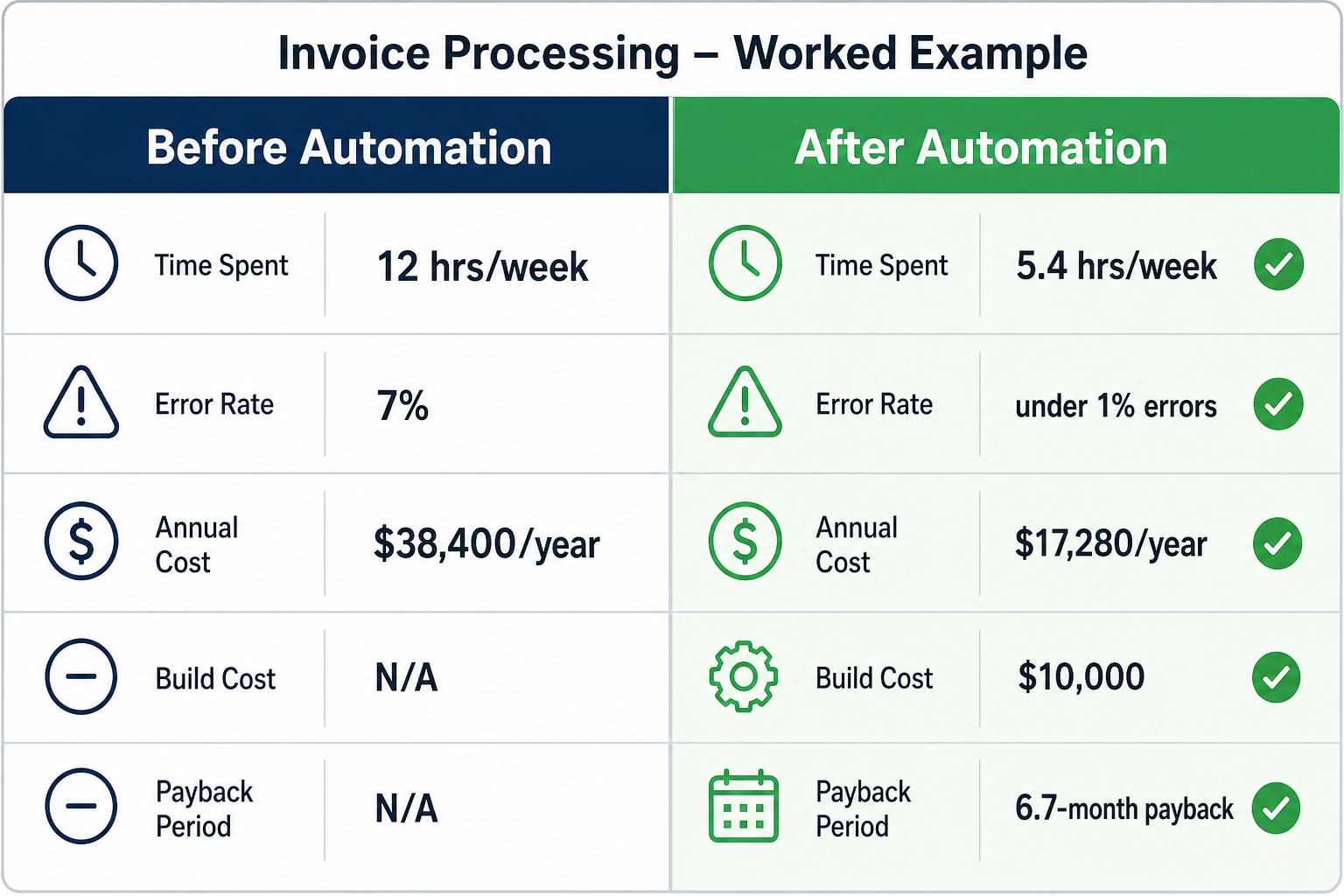
Monthly savings: $21,120 / 12 = $1,760/month
Monthly operating costs: $3,200 / 12 = $267/month
Net monthly benefit: $1,760 - $267 = $1,493/month
Payback period: $10,000 / $1,493 = 6.7 months
Three-year net benefit: ($1,493/month x 36 months) - $10,000 build cost = $43,748
The ROI Table: Fill In Your Own Numbers
Here's the framework in a format you can use. Fill in your actual numbers in the "Your Business" column.
| Calculation Step | Formula | Example (3-Person Team) | Your Business |
|---|---|---|---|
| 1. Hours per week on process | Measured, not estimated | 12 hrs/week | _ |
| 2. Loaded hourly rate | Salary / 2,080 x 1.5 | $40/hr | _ |
| 3. Current Annual Time Cost | Hours x Rate x 52 | $24,960 | _ |
| 4. Monthly volume | Count transactions/tasks | 200 invoices | _ |
| 5. Error rate | Audit 6-8 weeks of data | 7% | _ |
| 6. Cost per error | Direct + downstream rework | $80 | _ |
| 7. Annual Error Cost | (Volume x Rate x Cost) x 12 | $13,440 | _ |
| 8. Total Annual Baseline Cost | Time Cost + Error Cost | $38,400 | _ |
| 9. Conservative Savings % | Use 40-55% (not vendor's 80%) | 55% | _ |
| 10. Projected Annual Savings | Baseline x Savings % | $21,120 | _ |
| 11. Build Cost | Get 2-3 quotes, add 20% buffer | $10,000 | _ |
| 12. Annual Operating Cost | Subscriptions + compute + maintenance | $3,200 | _ |
| 13. Monthly Net Benefit | (Savings - Operating Costs) / 12 | $1,493/month | _ |
| 14. Payback Period | Build Cost / Monthly Net Benefit | 6.7 months | _ |
| 15. 3-Year Net Benefit | (Monthly Net x 36) - Build Cost | $43,748 | _ |
If your payback period is under 12 months and your three-year net benefit is significantly higher than your build cost, you've got a project worth doing. If not, go back and look at whether you're targeting the right process, or whether the build estimate is too high.
What the Numbers Don't Tell You
I want to be honest about where this framework has limits, because I've learned from the ones I've gotten wrong.
The hidden costs that don't fit in a spreadsheet. Change management is real. When you automate a process someone has done manually for five years, there's disruption. There's the learning curve. There's the psychological adjustment of the team. Budget time and energy for this, even if you can't put a clean dollar figure on it.
Data quality will surprise you. More AI projects fail because of poor data quality than because of technical limitations.[2] If your invoice PDFs are inconsistent, scanned at odd angles, or formatted across 40 different vendor templates, your extraction accuracy will be lower than the benchmark, and your error reduction will be lower than you modeled. Do a data audit before you finalize your savings estimate.
The "set and forget" assumption. AI models drift. Business conditions change. What worked beautifully in month one starts making more exceptions by month fourteen if nobody's watching. The 15% to 25% annual maintenance budget isn't optional: it's the cost of keeping the gains real.[6]
Realistic savings percentages by process type. If you're trying to figure out what savings percentage to plug into Step 3, here's what the research suggests for common processes:
- Invoice and document processing: 55% to 70% labor reduction[9]
- Customer support triage: 40% to 60% deflection[10]
- Data entry and extraction: 65% to 80% time reduction[5]
- Scheduling and coordination: 30% to 50% time reduction
- Financial reconciliation: 40% to 60% error reduction
- Report generation: 60% to 75% time reduction
Use the low end of whatever range applies to your process.
The Processes Most Likely to Pay Back Fast
In my experience, the fastest payback comes from processes that share four characteristics:
High volume. The more times a process runs, the more times automation pays you back. 200 invoices per month beats 20 invoices per month every time.
Well-defined inputs. Processes where the inputs are consistent, structured, and predictable are easier to automate accurately. The messier the input, the higher the error rate, and the lower your real savings.
Clear, measurable output. You need to know what "done" looks like. If the output of a process requires subjective judgment, AI can assist, but it can't own it.
High cost of errors. If a wrong entry causes real downstream pain, accuracy improvements have multiplied value. This is where the error rate calculation in Step 2 matters most.
Invoice processing, scheduling, data extraction, standard report generation, and first-tier customer inquiries hit all four criteria well. Strategic decisions, nuanced client communication, and anything requiring institutional knowledge of context generally don't.
My Direct Recommendation
Don't let a vendor calculate your ROI for you. Their job is to make the numbers look good enough to close the deal. Your job is to make sure the numbers are true.
Run your own baseline audit. Spend two weeks actually measuring how long the process takes, how many errors it generates, and what those errors cost. That data is worth more than any vendor benchmark.
Then apply conservative savings percentages. If the math still works on the low end, you've got a project worth pursuing. If it only works on the optimistic end, you're buying hope, not a system.
I'll be honest: I'm new to AI consulting specifically. What I bring is 30 years of building real systems, a Cap Gemini background helping businesses navigate a technology paradigm shift (the internet, before most people had email), and hands-on experience building AI agents and web apps. At Cap Gemini in the 1990s, we were helping large organizations make hard investment decisions about transformative technology with no track record and plenty of vendor hype. The discipline was identical: define the outcome in dollar terms first, hold the project accountable to that number after launch, and walk away from deals that only work on the optimistic scenario.
That's still the right framework. The math tells you whether the opportunity is real. It also tells you, clearly and early, when to walk away, which is sometimes the most valuable thing a calculation can do.
Sources
[1] Gartner, "Gartner Predicts 30% of AI Projects Will Be Abandoned After Proof of Concept," https://www.gartner.com/en/newsroom/press-releases, 2025
[2] Fullview, "200+ AI Statistics and Trends for 2025," https://www.fullview.io/blog/ai-statistics, 2025
[3] Automaton Agency, "AI Automation ROI: What to Realistically Expect in 2026," https://automatonagency.com/insights/ai-automation-roi-what-to-expect, 2026
[4] Automaton Agency, "Payback Period Benchmarks by Business Size and Use Case," https://automatonagency.com/insights/ai-automation-roi-what-to-expect, 2026
[5] Upvalo, "Calculate ROI of AI Automation: Proven Framework + 3 Real Case Studies," https://upvalo.com/calculate-roi-ai-automation/, 2026
[6] AppIt Software, "AI Automation ROI Calculator: How to Build a Business Case for AI Investment," https://www.appitsoftware.com/blog/ai-automation-roi-calculator-business-case-guide, 2025
[7] AI Crescent, "AI Automation for Small Business: Complete 2026 Guide (With ROI Data)," https://www.ai-crescent.com/blog/ai-automation-for-small-business, 2026
[8] Master of Code, "AI ROI: Why Only 5% of Enterprises See Real Returns in 2026," https://masterofcode.com/blog/ai-roi, 2026
[9] Arsum, "AI Automation ROI Examples That Prove Business Value," https://arsum.com/blog/posts/ai-automation-roi-examples/, 2025
[10] IBM, "How to Maximize AI ROI in 2026," https://www.ibm.com/think/insights/ai-roi, 2026