The 30/60/90 Day Plan for Getting Your First AI Agent Running
Here's something I see happen constantly: a business leader reads about AI, gets excited, picks the most visible, most painful problem in their operation, and tries to automate it in a weekend. Six weeks later, they've spent $15,000 on a tool that nobody uses and the process is more broken than before. They conclude that "AI doesn't work for businesses like mine."
It doesn't not work. They just skipped the boring parts.
I've been building systems that survive contact with reality for over 30 years. I founded adoption.com in 1995, before Google existed, when "automating a workflow" meant writing your own code or doing it by hand. I've run operations across seven countries: the United States, Ethiopia, Kenya, Haiti, Mexico, China, and England. I've managed humanitarian supply chains where a broken process doesn't mean a failed launch, it means children go without food. That background shapes how I think about implementation: methodically, with documentation, with fallback plans, and with zero tolerance for hype.
So let me give you the actual playbook.
The number that should get your attention first: 70 to 85% of AI initiatives fail to meet expected outcomes.[1] In 2025, 42% of companies abandoned most of their AI projects, up sharply from 17% the year before.[2] The average organization scrapped 46% of AI proof-of-concepts before they ever reached production. And only 26% of organizations have the internal capabilities to move an AI project from proof-of-concept to actual deployment.[1]
These aren't technology failures. They're planning failures. The good news: planning is something you can control.
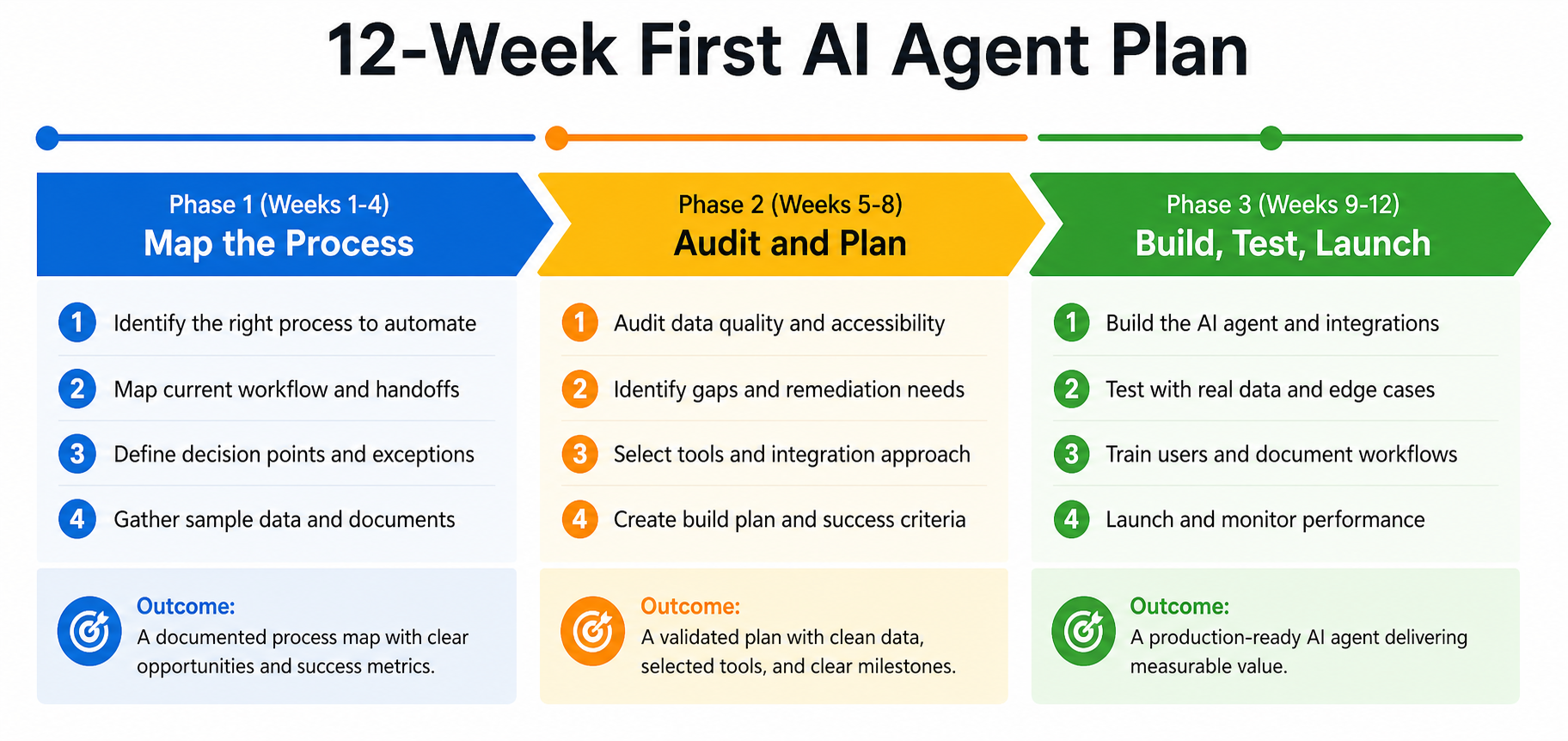
Here's the 90-day plan that actually works.
Before Day One: The Rule About Which Process to Pick
I want to address this before the clock even starts, because it's where most people get it wrong.
Do NOT pick your biggest problem. Do NOT pick the process that "would save us the most money if it worked." Do NOT pick the one your CEO is most excited about.
Pick your most documented, most repetitive, lowest-stakes process. A process where a mistake is embarrassing but not catastrophic. A process where someone on your team could already write down every single step without thinking hard. A process with clear inputs and a clear definition of what "done" looks like.
Why? Because your first AI agent isn't really about the process. It's about learning how to build, test, and deploy AI agents in your specific environment. The process is the vehicle for that learning. You want the easiest possible vehicle so the learning can be the focus.
The research bears this out. The workflows that succeed are time-intensive and repetitive, with decision-making criteria that can be clearly defined.[3] The workflows that fail are the ones where "you can't explain it in two simple sentences" or where it "depends on judgment calls you haven't spelled out."[3]
Good first candidates: weekly reporting, invoice categorization, scheduling follow-ups, routing incoming inquiries, summarizing customer feedback, generating first drafts of routine emails.
Bad first candidates: anything involving final decisions on money, anything requiring deep human judgment, anything where your team doesn't agree on what the right answer even is.
Once you've picked it, you're ready to start the clock.
Days 1 to 30: Map the Process Until You're Bored of It
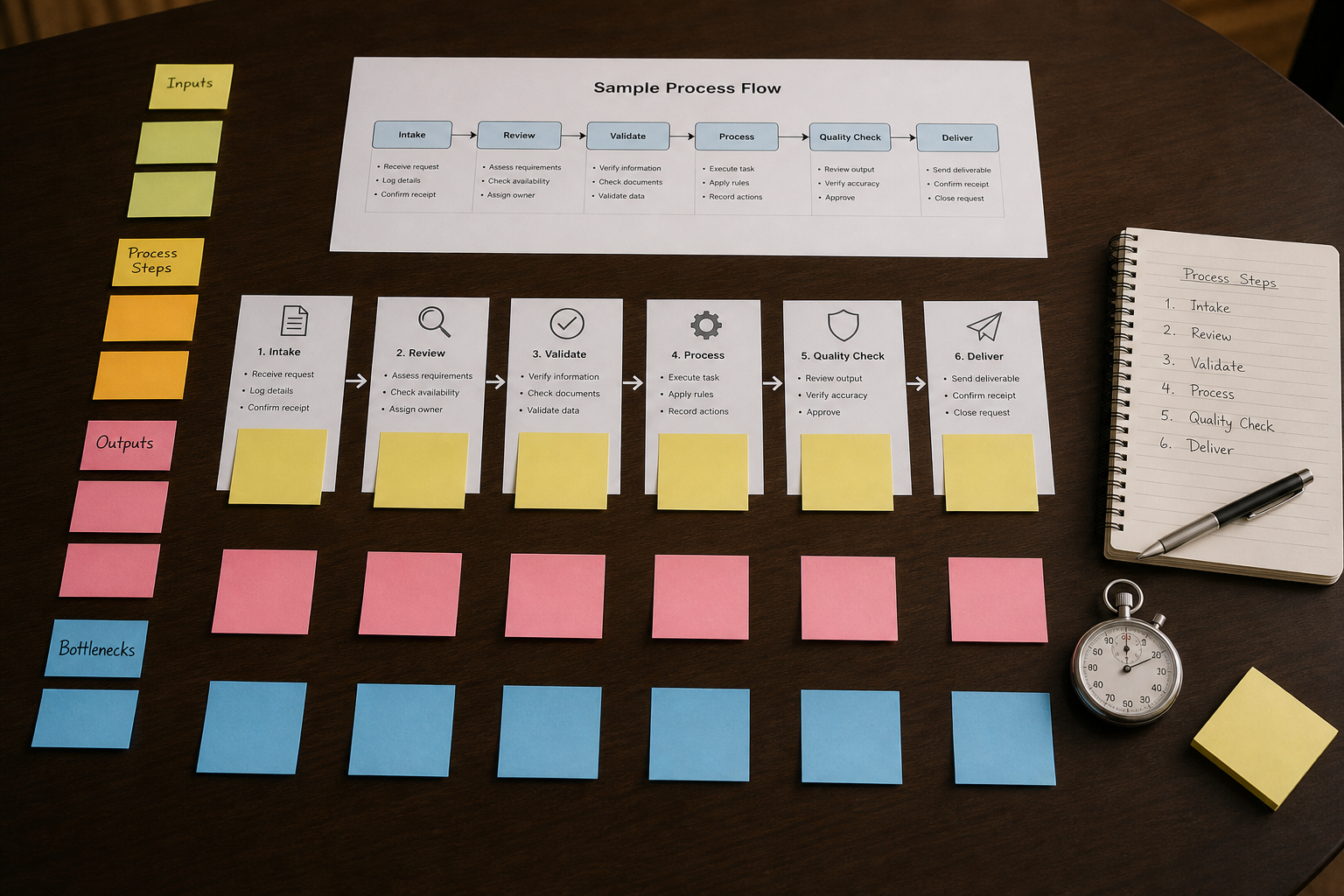
The first month has nothing to do with AI. It's about understanding your process deeply enough that you could hand it off to a careful stranger and they'd do it correctly every time.
I come from a medical technology background. In clinical lab work, before you automate any test, you have to validate the manual process completely. You document the reference range. You document the exceptions. You run controls. You know exactly what "correct" looks like before you ever trust a machine with a real patient sample. The same discipline applies here.
Week 1: Observe and Time
Task checklist for Week 1:
- [ ] Shadow the person (or people) who currently do this process. Watch them do it at least twice, start to finish.
- [ ] Write down every single step in order. Don't rely on anyone's memory of how it "should" work. Watch how it actually happens.
- [ ] Time the process with a stopwatch. Document: how long does the whole thing take? How long does each major step take?
- [ ] Count the volume: how many times does this process run per day, week, or month?
- [ ] Calculate the total time cost: time per run multiplied by volume. This is your baseline. Write it down.
- [ ] Note every tool that's touched during the process (spreadsheets, email, CRM, Slack, whatever).
That last calculation matters. If the process takes 12 minutes and runs 40 times a month, that's 8 hours a month. If you get that down to 2 minutes per run, you've recovered 6.7 hours. Know this number before you build anything. It's the only honest ROI calculation you can make.
Week 2: Map the Inputs and Outputs
Task checklist for Week 2:
- [ ] Define the trigger: what exact event starts this process? (An email arrives, a form is submitted, a date on the calendar, someone says "go.")
- [ ] List every input the process requires: what data does the person need to complete it? Where does that data live?
- [ ] Define the output: what exactly gets produced at the end? What does it look like? Where does it go?
- [ ] Map the handoffs: if multiple people touch this process, document who hands off to whom and when.
- [ ] Identify tools involved: what does the output live in? A spreadsheet? A CRM record? An email? A document?
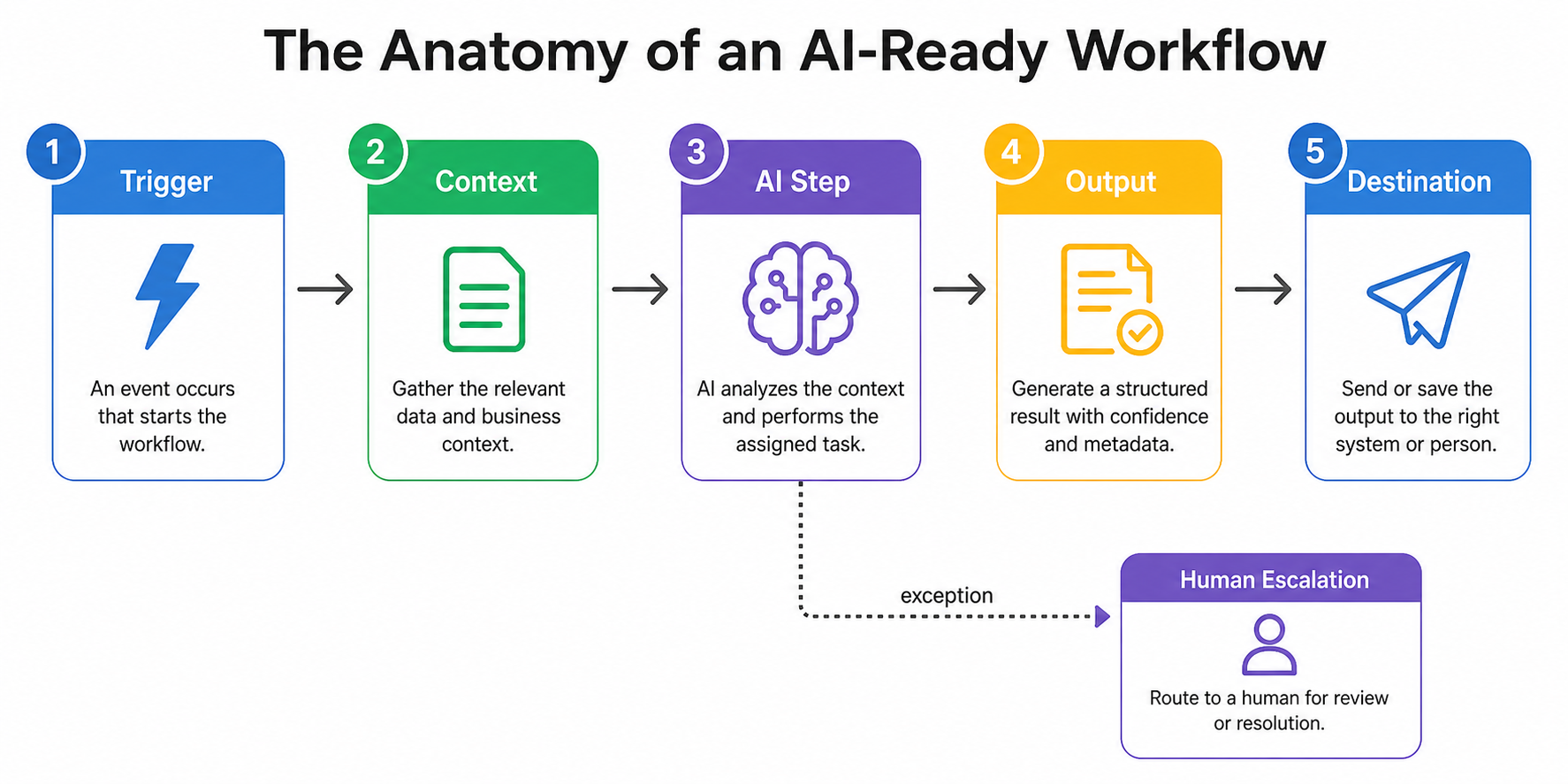
- [ ] Draw a simple process map with five elements: Trigger → Context Needed → Work Steps → Output → Where Output Goes.
This five-element map is the skeleton of your future AI agent. The agent will need to handle each of these same five elements. If you can't draw this map cleanly, your process isn't ready to be automated.
Week 3: Document the Exceptions
This is the week most people skip. Don't.
Task checklist for Week 3:
- [ ] Ask the person who does this process: "What happens when something goes wrong?" Write down every answer.
- [ ] Ask: "Are there any situations where you do something different from the normal steps?" Write those down too.
- [ ] Ask: "What's the hardest part of this process? What requires the most judgment?"
- [ ] For each exception you find, decide: is this a "rule" (happens predictably enough that you can write an if/then statement for it) or a "judgment call" (requires a human)?
- [ ] Make a list of all the judgment calls. These are your human-in-the-loop requirements. Any time the AI hits one of these, it needs to route to a human for approval.
- [ ] Write a one-paragraph definition of what a correct output looks like. Be specific. If the output is an email, what's the tone? What information must it include? What should it never say?
That last document is called your success definition. You'll use it in month two. It's the standard your AI output gets measured against.
Week 4: Validate Your Baseline and Confirm Readiness
Task checklist for Week 4:
- [ ] Run the process five more times, this time tracking time and output quality simultaneously.
- [ ] Calculate your current error rate: what percentage of outputs require rework or human correction?
- [ ] Document the total monthly cost: time cost (hours multiplied by hourly rate of the person doing it) plus any direct costs.
- [ ] Confirm that you have at least 20 real historical examples of this process: 20 inputs with their correct outputs. These will become your test set.
- [ ] Get stakeholder agreement: talk to the person who currently does this process. They need to be a partner in the AI build, not a bystander.
- [ ] Make a go/no-go decision: if you can't clearly document the process, if exceptions outnumber rules, or if there's no clean definition of correct output, pick a different process and restart.
If you've completed all four weeks, you now have something most organizations never produce: a fully documented, measured, exception-annotated process with a defined success standard. That document is worth more than any AI tool you'll buy.
Days 31 to 60: Audit Your Data, Choose Your Tools, Scope the Build
Month two is where you shift from understanding the process to preparing the environment for an AI to operate in. There are three things you need: clean enough data, a clear definition of success, and a tool that matches your actual technical capacity.
Week 5: Data Audit
AI effectiveness depends heavily on data quality.[4] This isn't a cliche, it's an operational reality. An AI agent that processes invoices is only as good as the invoice data it can access. An AI that routes customer inquiries is only as good as the categories you've defined for it to route to.
Task checklist for Week 5:
- [ ] Locate every data source the process touches. Make a list with: source name, where it lives, who owns it, and how it gets updated.
- [ ] For each data source, answer: is it accessible? (Can a system read it, or is it locked in a PDF or someone's head?)
- [ ] Assess data quality: spot-check 20 records in each source. What percentage are complete? What percentage are consistent in format?
- [ ] Identify your biggest data problem. It's almost always one of these: data is in a format no tool can read (scanned PDFs, images, freeform text), data lives in a system with no API or export function, or data is inconsistent (the same thing written 12 different ways by 12 different people).
- [ ] Decide what can be cleaned now (within the 30-day window) and what is a permanent constraint the AI needs to work around.
Don't let the data audit stop your project. Perfect data is a myth. But you do need to be honest about what you have. An AI that works beautifully on clean data and fails on your real data is not a working AI.
Week 6: Define Success Precisely
Task checklist for Week 6:
- [ ] Take the success definition you wrote in Week 3 and make it measurable. For each output, define: what does "correct" look like in a way you can score 0 or 1?
- [ ] Build a simple evaluation rubric: a checklist a human reviewer can use to grade any AI output in under 60 seconds.
- [ ] Define your accuracy threshold: what percentage correct is "good enough to deploy"? Be honest. For a customer-facing email, you probably want 95%+. For an internal categorization task, 85% might be fine.
- [ ] Define your volume threshold: how many transactions per month justify the build cost?
- [ ] Define your failure mode: when the AI gets it wrong, what happens? Who catches it? How does it get fixed?
That last point is where I see the most planning gaps. People build AI agents as if failure isn't possible. It always is. Your human-in-the-loop protocol isn't a weakness in your system. It's what makes the system safe enough to actually use.
Week 7: Choose Your Tooling
Task checklist for Week 7:
- [ ] List your constraints: What's your technical capacity? Do you have a developer, a no-code-comfortable ops person, or just you?
- [ ] Match tooling to capacity. For non-technical teams, Zapier and Make (formerly Integromat) offer visual interfaces with minimal setup and free tiers that let you build working automations quickly.[5] For teams with some technical capacity, n8n offers more flexibility with self-hosting options. For teams with developers, tools like LangChain or purpose-built agentic platforms give more control.
- [ ] Evaluate tool integration: can this tool connect to the data sources you identified in Week 5? Make this non-negotiable. A beautiful tool that can't read your data is useless.
- [ ] Check total cost of ownership: subscription costs, integration costs, and any per-transaction pricing. AI tools are notoriously cheap until they're not. Know your cost per run at your expected volume.
- [ ] Do a one-hour prototype: before committing, spend an hour trying to connect your primary data source to your chosen tool. If you can't get data flowing in an hour, reconsider the tool.
Don't overbuild. Your first AI agent should do one thing. Resist the temptation to add features during the build phase. Features you add before launch are features that delay launch and introduce failure modes before you have any baseline to compare against.
Week 8: Scope the Build
Task checklist for Week 8:
- [ ] Write a one-page build spec. It should include: trigger definition, inputs and where they come from, what the AI step does (be specific), what the output looks like, where it goes, and what happens when it fails.
- [ ] Identify your three biggest technical risks. For each one, write a sentence describing what you'll do if it doesn't work.
- [ ] Set a time budget for the build: how many hours will you (or your developer) spend building this? Commit to that number. The goal is a minimal working version, not a perfect one.
- [ ] Schedule your test dataset: pull those 20 historical examples you collected in Week 4 and format them as test cases.
- [ ] Get a second person to review your build spec before you write a single line of code or create a single automation node. Have them try to break it with edge cases.
Days 61 to 90: Build Minimal, Test Real, Launch Soft, Iterate
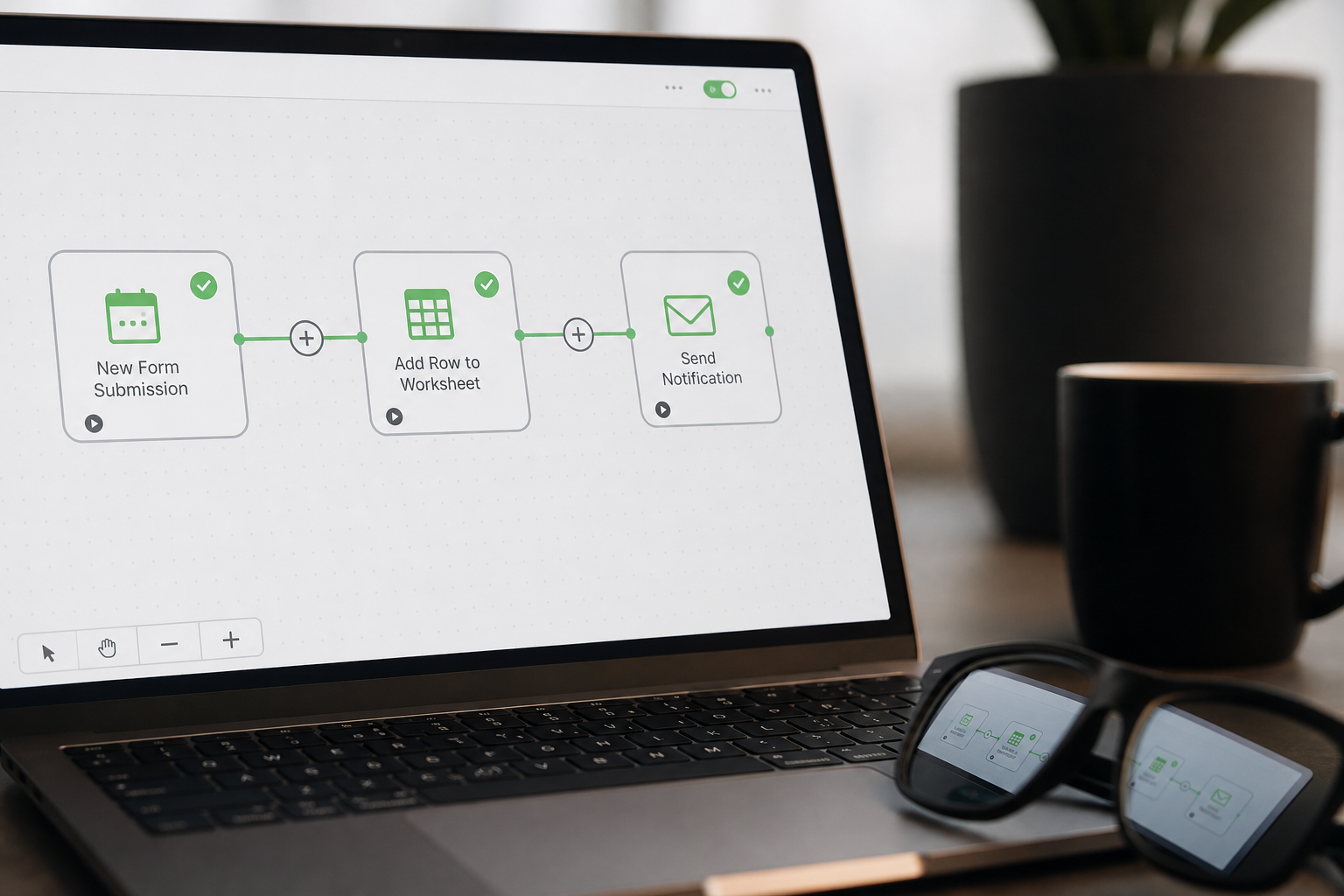
Month three is where you finally build. But notice how far into the process we are before we touch a tool. That's intentional. The build is the easiest part of a well-planned AI project. It's also where most projects begin, which is why most projects fail.
Week 9: Build the Minimal Version
Task checklist for Week 9:
- [ ] Build only what's in your Week 8 spec. Nothing else.
- [ ] Connect your data sources.
- [ ] Build the trigger.
- [ ] Build the AI processing step.
- [ ] Build the output.
- [ ] Build the failure routing (what happens when the AI isn't confident, or when it hits an exception from your Week 3 list).
- [ ] Do NOT add logging, reporting dashboards, or additional features yet. That comes after you've confirmed the core works.
The "minimal" in minimal viable product is load-bearing. Organizations that successfully deploy AI are distinguished not by their sophistication but by their willingness to launch something small and imperfect and learn from it.[6]
Week 10: Test With Real Data
Task checklist for Week 10:
- [ ] Run your 20 historical test cases through the system. Score each output against your evaluation rubric from Week 6.
- [ ] Calculate your accuracy rate. Does it meet your threshold?
- [ ] For every failure, categorize it: was it a data problem, a prompt problem, an integration problem, or an edge case you didn't document?
- [ ] Fix the most common failure category first.
- [ ] Run 10 new test cases (real examples from the current week, not historical ones). This tests whether the system handles fresh data the same way it handles your test set.
- [ ] If accuracy is below threshold, identify the single biggest improvement you can make and make it. Then retest. Do not make multiple changes at once. You need to know which change improved performance.
This is the week you'll discover the gap between what you thought the process was and what it actually is. Expect surprises. I've never run a Week 10 without finding at least one exception that wasn't in my Week 3 documentation. That's normal. Document it and handle it.
Week 11: Soft Launch With One User
Task checklist for Week 11:
- [ ] Pick one user: ideally the person who currently does this process manually. They have the most context. They'll catch problems faster than anyone.
- [ ] Run the AI and the manual process in parallel for this week. The human still does the work; the AI also does the work. Compare outputs.
- [ ] Set up a simple feedback mechanism: a shared document, a Slack channel, or even a daily 10-minute check-in where the user flags anything that looks wrong.
- [ ] Do NOT announce this widely. A soft launch is quiet on purpose. You want real-world data without the pressure of an organizational rollout.
- [ ] Track: how often does the AI output require human correction? What types of corrections are most common?
- [ ] At the end of the week: make a go/no-go decision on formal launch. The standard isn't perfection. It's: is this better than doing it manually, and is the failure mode safe?
The "better than manual" threshold is important. A lot of AI agents clear 85% accuracy, which sounds mediocre until you realize the manual process has a 12% error rate. You're not comparing AI to perfect. You're comparing AI to human, and humans make mistakes too.
Week 12: Iterate, Document, and Formally Hand Off
This is the week most implementations skip. The system works. People are using it. Everyone moves on. Six months later, the person who built it has left the company, nobody knows how it works, and the first time something breaks, nobody knows how to fix it.
Don't do that.
Task checklist for Week 12:
- [ ] Write the operations documentation: what does this system do, how does it work, what does each component do, how do you test if it's working, what are the most common failure modes and how do you fix them?
- [ ] Document the escalation path: if the system fails at 2 AM, who gets the alert, and what do they do?
- [ ] Set up basic monitoring: at minimum, a way to know if the process stopped running. A simple daily email summary of outputs, a count of runs per day, anything that gives you visibility.
- [ ] Formally communicate the launch: tell the team what this system does, what it doesn't do, how to flag a problem, and who owns it.
- [ ] Schedule a 30-day check-in: put it on the calendar now. In 30 days, you'll review accuracy, volume, time savings, and whether the original cost-benefit assumption held up.
- [ ] Update your process documentation with what you actually built (not what you planned to build, since these are often different).
What Happens After Day 90
If you've done this right, you have one working AI agent, a documented methodology for building the next one, a team that has seen AI succeed in your specific environment, and a baseline of real performance data.
That last item is the most valuable thing you built. Because the second AI agent is faster to build. The third one is faster still. The pattern compounds.
The organizations that are genuinely ahead on AI aren't the ones who bet everything on one big transformation project. They're the ones who shipped 12 small working agents over 18 months, learned from each one, and now have institutional knowledge that's impossible to buy.
I know what it's like to build systems that have to work the first time. In the countries I've worked in, you don't get a second chance when supply chains break or when the wrong information reaches the wrong family. That experience shaped my belief that methodical beats fast every time.
The 90-day plan is methodical. It front-loads the unglamorous work: the documentation, the data audit, the exception mapping, the success definition. It builds small. It tests honestly. It hands off with documentation.
That's not a limitation. That's how you build things that last.
A Note on What I've Seen Go Wrong
I want to be direct about the failure modes, because the research doesn't fully capture what they look like from the inside. I've built enough systems from scratch, in environments where failure had real consequences, to recognize these patterns clearly.
The first failure mode is choosing the wrong first process. Organizations try to automate their most complex workflow first because it has the biggest ROI on paper. The ROI is on paper because the process is too complex to automate cleanly. The AI produces mediocre outputs. The team loses confidence. The project dies.
The second failure mode is skipping the data audit. I've watched teams spend months building a beautiful AI agent only to discover in Week 10 that their data lives in a legacy system with no API, or that the "structured data" they assumed they had is actually 40% freeform text fields written by 20 different people over 10 years.
The third failure mode is no human-in-the-loop. Teams get excited about full automation and remove the human review step to save time. Then the AI makes a confident, wrong decision on something customer-facing, and the fallout costs more than the entire project saved. The research is clear: for high-stakes workflows, always include a step where a human must approve.[3]
The fourth failure mode is no documentation. A system that works but isn't documented isn't an asset. It's a liability waiting to materialize the moment the person who built it leaves.
The 90-day plan is specifically designed to route around all four of these.
Your Week-by-Week Summary Checklist
Days 1 to 30: Map the Process
- Week 1: Observe, time, and measure current state
- Week 2: Document inputs, outputs, triggers, and tools
- Week 3: Document exceptions and define success
- Week 4: Validate baseline and confirm readiness
Days 31 to 60: Audit and Plan
- Week 5: Data audit across all sources
- Week 6: Define measurable success criteria and accuracy threshold
- Week 7: Choose tooling matched to your technical capacity
- Week 8: Write the build spec and identify technical risks
Days 61 to 90: Build, Test, Launch
- Week 9: Build the minimal version only
- Week 10: Test with real data, iterate on the single biggest failure
- Week 11: Soft launch with one user, run parallel with manual process
- Week 12: Iterate, document, formally hand off, schedule 30-day check-in
The Real ROI Question
You've seen the productivity numbers in AI coverage: 28 to 35% productivity increases, 15 to 22% cost reductions.[7] I want to be honest with you about those numbers. They're averages across organizations that have been implementing AI for years, often with dedicated technical teams.
Your first agent probably won't deliver those numbers. Your first agent might save 8 hours a month and have an 88% accuracy rate. That's a successful first agent.
What your first agent will deliver that doesn't show up in those statistics: the organizational learning of having done it once. The documentation of one process that was previously tribal knowledge. The confidence to build the second agent faster. The credibility to get budget for a third.
Most respondents to McKinsey surveys achieve satisfactory AI ROI within 2 to 4 years.[8] Not 90 days. But you have to start somewhere. The organizations that will have 4-year AI ROI in 2028 are the ones who started in 2024 or 2025. Or now.
The first agent is not the destination. It's the proof of concept for your own organization that this is possible, that your team can do it, and that the methodology works.
I'm new to AI consulting as a practice, and I won't pretend otherwise. What I bring is 30 years of building real systems, a Cap Gemini background helping businesses develop internet strategy before Google existed, and hands-on experience building AI agents and web apps using Claude Code and Codex. I know what the implementation work actually feels like because I've done it, not just advised on it.
The organizations that succeed aren't smarter or better resourced. They're more methodical. They do the boring work first. They resist the hype. They ship small, learn fast, and compound.
That's the 90-day plan. Start with the most documented process you have. And start Monday.
Sources
[1] Fullview, "200+ AI Statistics & Trends for 2025: The Ultimate Roundup," https://www.fullview.io/blog/ai-statistics, 2025
[2] Beam.ai, "Why 42% of AI Projects Show Zero ROI (And How to Be in the 58%)," https://beam.ai/agentic-insights/why-42-percent-of-ai-projects-show-zero-roi-and-how-to-be-in-the-58-percent, 2026
[3] Patrick Frank, "AI Workflow Setup: First Project Guide," https://www.patrickfrank.com/post/setup-first-ai-workflow-without-getting-overwhelmed, 2025
[4] Use AI for Business, "Small Business AI Implementation Roadmap 2025," https://useaiforbusiness.com/blog/small-business-ai-implementation-roadmap-2025, 2025
[5] AI Workflow Setup Guide, "AI Workflow Automation: Complete Guide 2025," https://hypestudio.org/ai-workflow-automation-the-complete-guide-2025/, 2025
[6] Baytech Consulting, "Enterprise AI Implementation Plan: A 90-Day Roadmap for Leaders," https://www.baytechconsulting.com/blog/enterprise-ai-implementation-plan-90-day-roadmap, 2025
[7] AI Crescent, "AI Automation for Small Business: Complete 2026 Guide (With ROI Data)," https://www.ai-crescent.com/blog/ai-automation-for-small-business, 2026
[8] Fullview, "200+ AI Statistics & Trends for 2025: Time to ROI," https://www.fullview.io/blog/ai-statistics, 2025
[9] Pertama Partners, "AI Project Failure Statistics 2026: The Complete Picture," https://www.pertamapartners.com/insights/ai-project-failure-statistics-2026, 2026
[10] Next Level Partners, "A Practical 90-Day AI Readiness Roadmap Built on Lean, Clarity, and Intentional Transformation," https://nextlevelpartners.com/a-practical-90-day-ai-readiness-roadmap-built-on-lean-clarity-and-intentional-transformation/, 2025
[11] FS Agency, "Building Your 90-Day AI Roadmap: From Audit to Implementation," https://fsagency.co/ai-consulting/90-day-ai-implementation-roadmap/, 2026